Many Kenyans want to check or confirm a full M-Pesa phone number, especially before sending money or verifying a transaction. However, due to privacy and security rules, it is not possible to view a fully unmasked M-Pesa number through official channels unless you already have it. This guide explains what you can do legally and safely, and the best ways to verify M-Pesa details.
Why M-Pesa Numbers Are Masked
Safaricom, which operates M-Pesa, masks phone numbers to:
- Protect user privacy
- Prevent fraud and scams
- Secure financial transactions
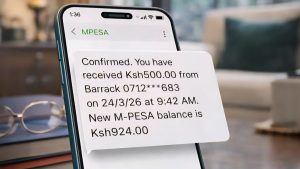
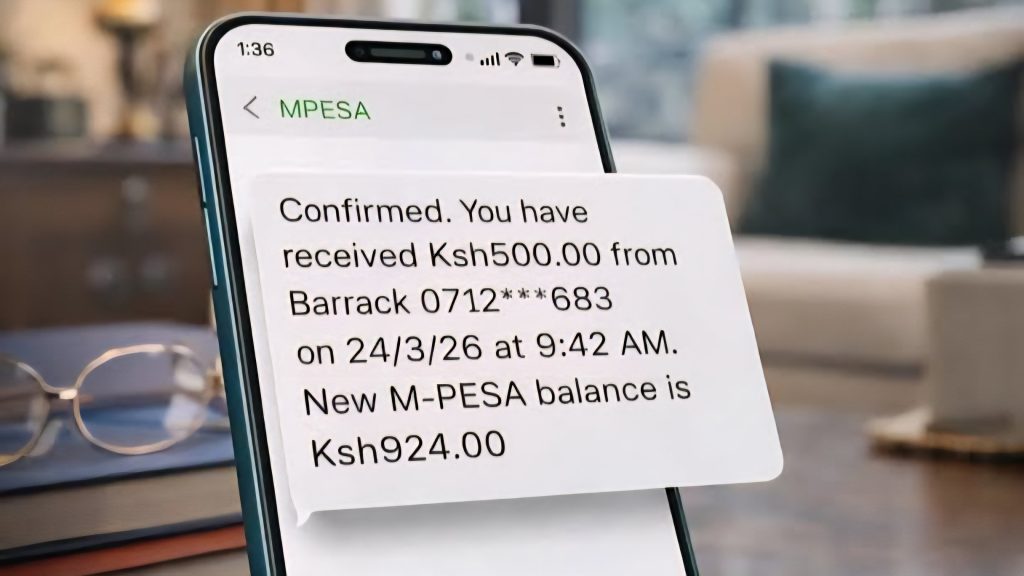
When you receive messages or confirmations, numbers may appear partially hidden, for example:
- 07XX XXX 123
Can You Check a Full Unmasked M-Pesa Number?
Methods to Check Full M-PESA Number:
- Forward SMS to 334: Forward the transaction SMS (showing
0745**638...) to 334. Safaricom will send an SMS acknowledgment, followed by the full number details. - Use USSD Code (*234#):
- Dial
*234#. - Select “My M-Pesa Information” (Option 2 or 7, depending on updates).
- Select “M-Pesa Statement”.
- Select “Mini Statement” or “Full Statement” to view the recent sender details.
- Dial
- MySafaricom App or M-PESA App: Log in, go to the M-PESA menu, select “Statements,” and choose “Mini Statement” to see the full phone number.
Safe Ways to Verify an M-Pesa Phone Number
1. Use the Send Money Prompt
When sending money via M-Pesa:
- Enter the phone number
- The system displays the recipient’s registered name
This is the most reliable way to confirm you are sending money to the right person.
2. Confirm With the Recipient
Always ask the recipient to:
- Share their number directly
- Confirm their registered M-Pesa name
3. Check Transaction Messages
After sending money, you will receive a confirmation message showing:
- Recipient name
- Phone number (sometimes partially masked)
- Transaction details
4. Use Saved Contacts
Saving trusted contacts reduces the risk of sending money to the wrong number.
Read Also: Updated M-Pesa Charges in Kenya 2026
Expert Insight
Peter Kariuki, a digital finance expert at Knowclick Media explains:
“M-Pesa masking is a security feature, not a limitation. It protects users from fraud. Instead of trying to unmask numbers, users should focus on verifying recipient names before sending money.”
Common Reasons People Want to Unmask Numbers
- Verifying a suspicious transaction
- Confirming the identity of a sender
- Recovering lost contacts
- Avoiding sending money to the wrong person
Risks of Trying to Unmask Numbers
Be cautious of:
- Apps claiming to reveal hidden numbers
- Online tools promising access to private data
- Scammers asking for personal details
These are often fraudulent and can lead to:
- Loss of money
- Data theft
- Account compromise
What to Do If You Suspect Fraud
If you receive suspicious messages or transactions:
- Contact Safaricom customer care immediately
- Do not share personal information
- Report the number through official channels
When You Can See Full Numbers
You can see full phone numbers when:
- You already have the contact saved
- The sender shares their number directly
- You initiate a transaction manually
Best Practices for M-Pesa Safety
- Always confirm the recipient’s name before sending money
- Double-check numbers before completing transactions
- Avoid sending money to unknown contacts
- Keep your M-Pesa PIN secure
Read Also: How to Buy and Sell NSE Shares on M-Pesa Using Ziidi Trader
Expert Opinion
Brenda Mueni, a financial safety analyst at Knowclick Media notes:
“The biggest mistakes in mobile money transactions come from rushing. Taking a few seconds to verify details can prevent losses.”
Security Tips
- Confirm Balance: Always check your actual M-PESA balance to confirm money was received before acting on any message.
- Beware of Fake SMS: Do not rely on SMS messages from personal numbers claiming a wrong transaction; only trust official M-PESA messages.
- Reversal Requests: If a sender claims they sent money by mistake, instruct them to initiate a formal reversal request via Safaricom.
Final Thoughts
While it is not possible to check a fully unmasked M-Pesa number through official means, there are safe and effective ways to verify transactions and avoid mistakes.
The key is to rely on system prompts, confirmation messages, and direct verification, rather than unsafe tools.
FAQs
Can I unmask an M-Pesa phone number?
No, for privacy and security reasons, full numbers cannot be revealed.
How do I confirm I am sending money to the right person?
Check the recipient’s name shown before completing the transaction.
Are there apps that can reveal hidden M-Pesa numbers?
No legitimate apps can do this. Most are scams.
What should I do if I send money to the wrong number?
Contact Safaricom immediately for assistance.